Production Day — The Field Operating System
A shoot day ran on a pile of disconnected artifacts — a call sheet in an inbox, a brief in a PDF, a shot list in a doc, a 'running late' text, a hard drive handed over with a sticky note, and a wrap conversation that happened three days later or never. Every gap in that pile cost somebody time on set.
ROLE
Designer, engineer & operator
STACK
React + TypeScript · Supabase / Postgres + RLS · Edge Functions (Deno) · Offline-first PWA + Capacitor · Web Push (self-implemented VAPID) · Tool-using AI assistant
WHO IT'S FOR
Crew in the field, and the admins who staff them
SCOPE
Brief · travel · spec · capture · wrap · career
SPINE
One shoot, one content ID, every system
CLIENT SURFACE
A single read-only tracking link
The pile
Field production runs on artifacts that don't know about each other. The call sheet is an email. The brief is a forty-slide deck. The shot list is a doc. "Running late" is a text. The footage arrives on a drive with a sticky note, and the context that would have made the edit easy is in somebody's head, three days cold.
One screen, in the right order
Production Day is the app a videographer runs the day from — mobile-first, installable, and working without signal. The production screen renders by phase — prep, travel, shoot, wrap — rather than by tab, so it shows only what matters at that moment. Nobody hunts through a menu with cold hands on a loading dock.
The client gets exactly one surface: a read-only tracking link showing stage, progress and crew ETA. No login, and no reason to phone the coordinator.
Everything else hangs off a single identifier — the content ID. One shoot, one ID, across the booking platform, this app, the edit pipeline and the reports. No re-keying, no fuzzy joins, no version of the truth only one system holds.
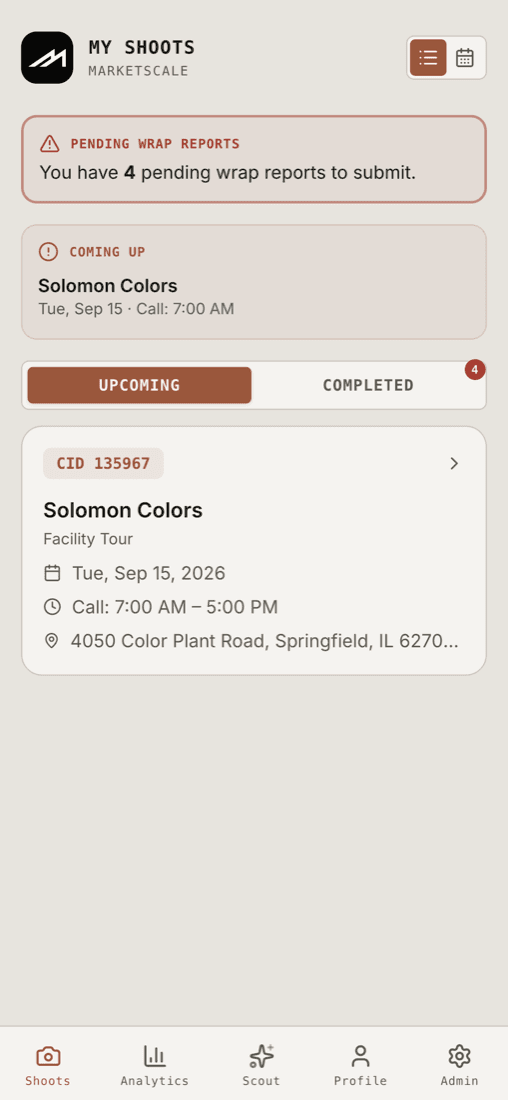
The whole job list is one screen
What a videographer opens: what they're shooting, when the call time is, and a standing nag about the wrap reports they still owe.
Only what matters, at the moment it matters
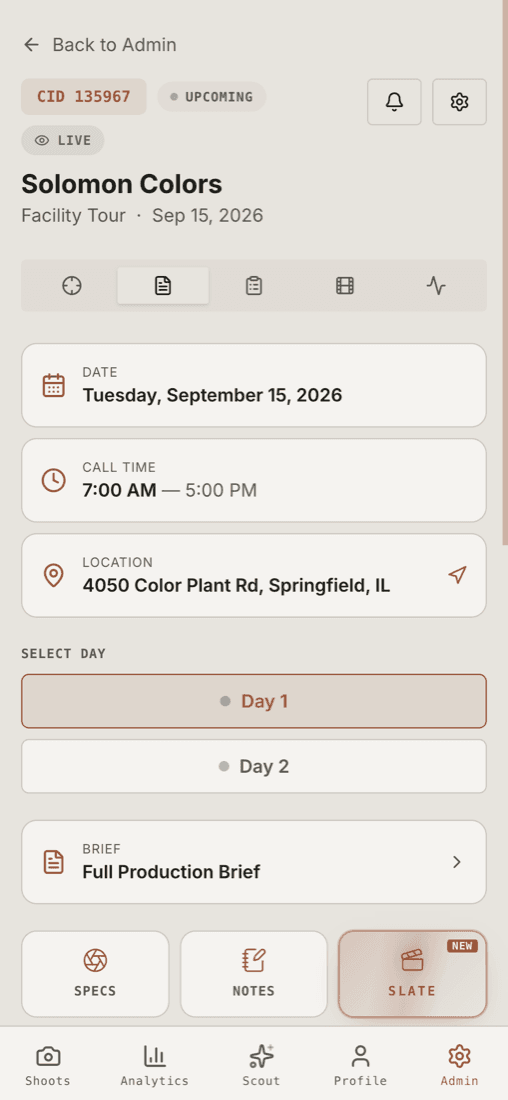
The shoot screen renders by phase — prep, travel, shoot, wrap — not by tab. Tap the address and it hands off to maps. Specs, notes and the slate are one tap away.
Good is written down, not assumed
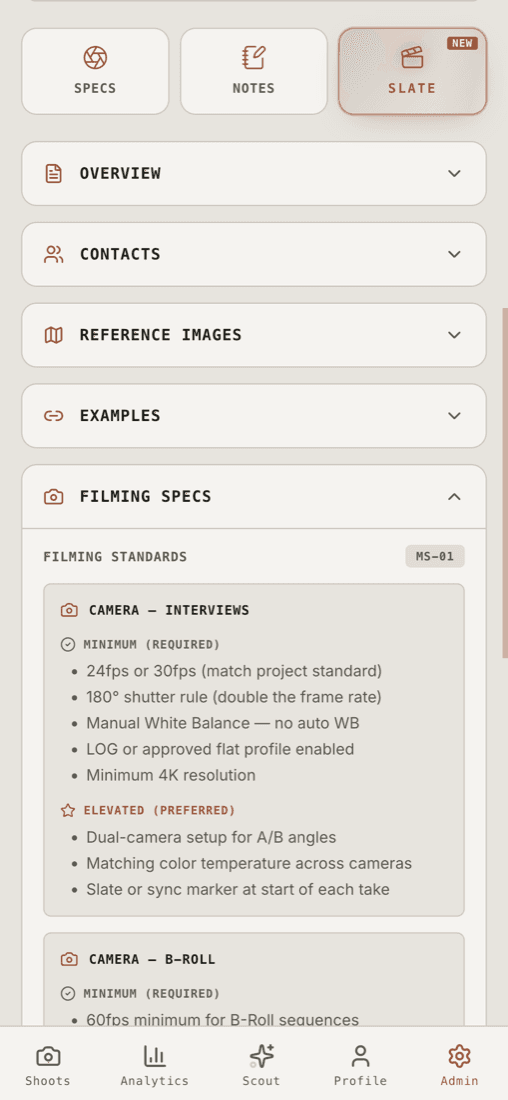
The filming standard lives in the app, split into what's required and what's preferred — so every shooter starts from the same camera, audio and data baseline.
A shot list nobody has to reconstruct
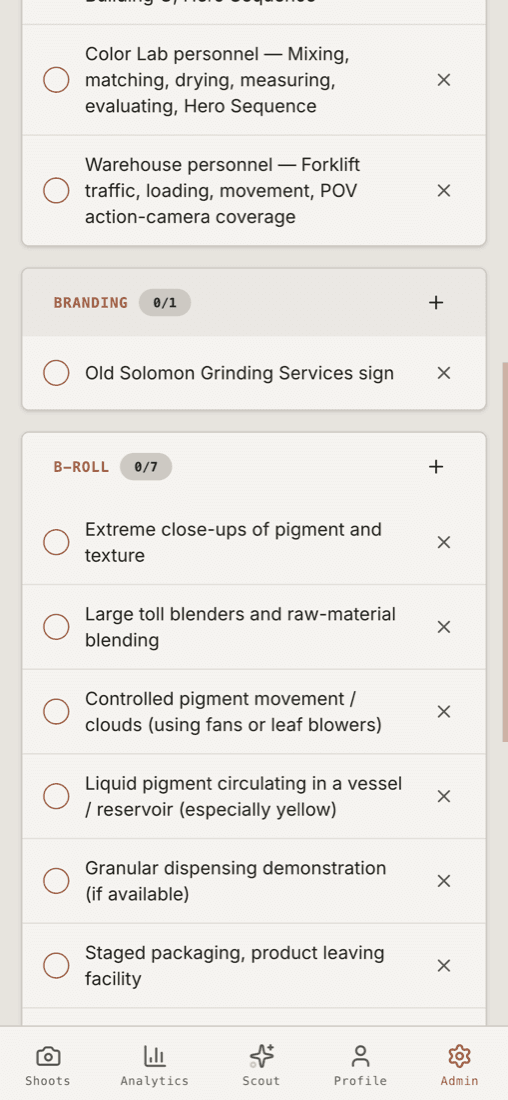
Parsed straight out of the production document into grouped, tickable shots — people to film, branding, B-roll — and a skip needs a reason, so it leaves a record.
An assistant with hands, not a chat box
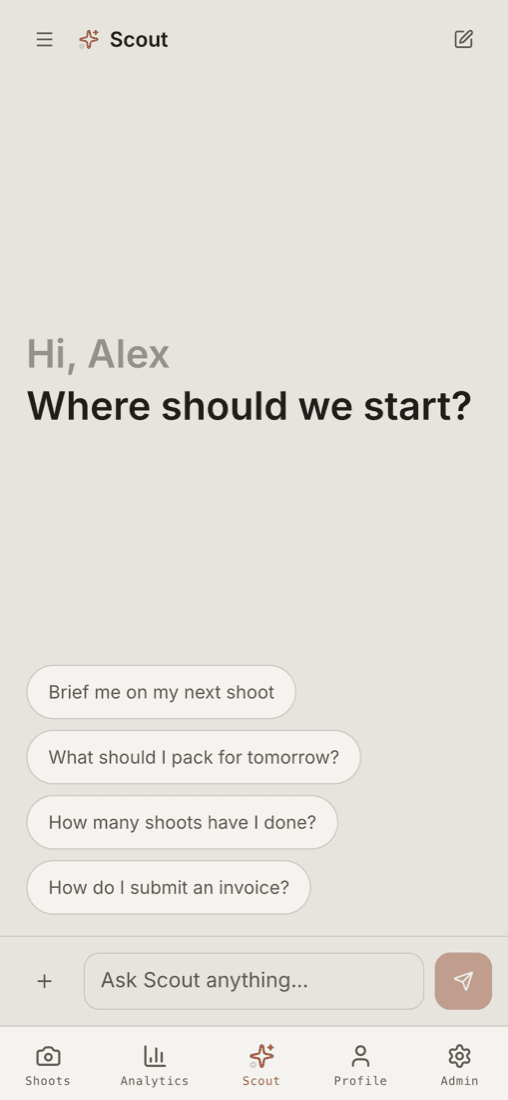
Scout answers from the real record — brief me on my next shoot, what should I pack tomorrow, how many have I done — and for admins it assigns crew and finds schedule conflicts.
Their kit becomes an asset, not a memory
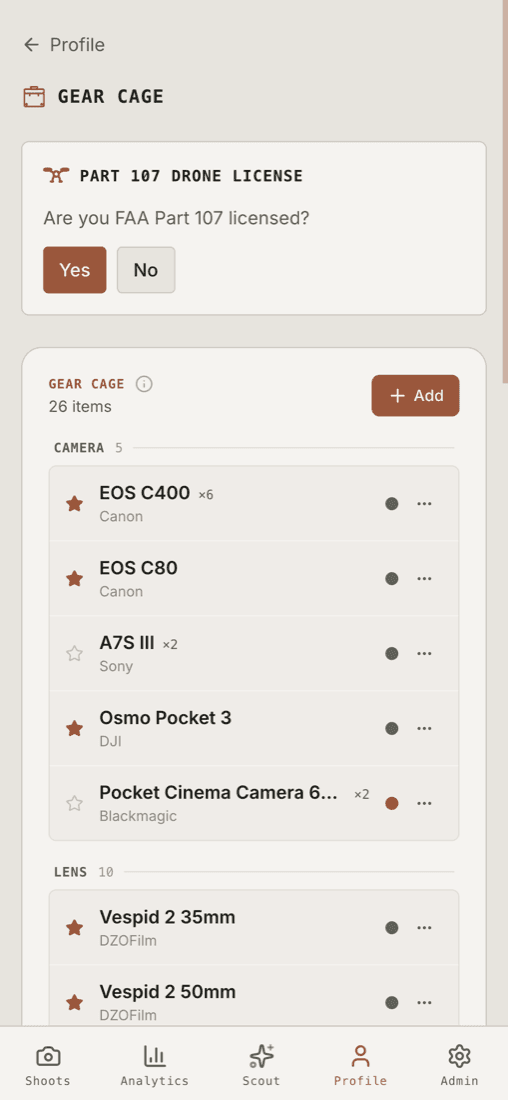
A personal gear cage across eleven categories with status, key-equipment flags and drone-licence expiry — which is also what lets Scout build a pack list from what they actually own.
Nothing happens without a trace
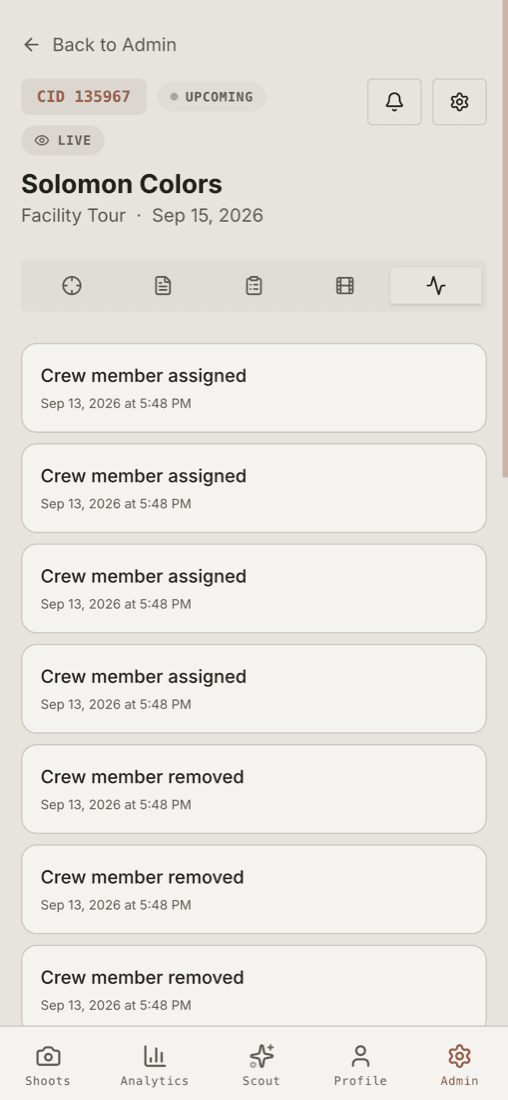
Every assignment, removal and edit is stamped and kept. When someone asks why a shoot changed three weeks later, the answer is a record rather than a memory.
Explore the features in detail
Open any of the 6 below for how that part actually works.
Ingest — nobody types anything
A shoot arrives from the booking platform as a webhook, and the ingest layer
does far more than insert a row. It normalises the time formats humans actually
send (8, 0800, 8:00, 08:00:00), strips phone numbers people paste into
name fields, geocodes the address in the background, stores per-day arrays for
multi-day and multi-location jobs, matches crew by email, creates accounts
for anyone who doesn't have one, assigns them, publishes, and fires the
notifications.
Then the attached production documents — PDF, Word, PowerPoint — are parsed into a structured brief: schedule, contacts, parking, access, venue, people to film, interview questions, shot list, deliverables, reference images. Parsed values only fill gaps; anything the booking system stated explicitly wins.
Two database triggers act as safety nets: assigning crew publishes the shoot, and a published shoot with crew on it cannot be silently unpublished. That pair kills the single most common field failure — "I got the notification but the app says production not found."
Prep
The crew member sees the shoot, the client, the location (tap to navigate), their own call time, their per-day assignment ("Day 2 only"), their own rate, and a live weather forecast for the actual shoot window at the actual coordinates — because that decides which batteries, which ND and which jacket. The shoot adds itself to their real calendar through an ICS download or a subscribable feed, with an alarm already set. Reminders fire on their own: the day before, at call time, at the next schedule item, and again when a wrap report is overdue.
Travel
Two buttons: I'm on my way and I have arrived. The first starts streaming position, which powers the ETA panel, the coordinator's map and the client's tracking page. The second stamps arrival and flips the shoot to active. Two taps replace a dozen "where are you?" texts.
Shoot
The shot list is day-scoped and role-filtered, items can be added on site, and skipping one requires a reason — so a skip is a decision with a record, not a gap. There's a countdown to wrap, a threaded note feed with attachments, voice notes with transcription, and a per-shoot message channel so the conversation lives with the job instead of in a DM.
Talent releases are signed on the device with a signature pad and rendered server-side into a real PDF, capturing signer details, IP, user agent, timestamp and the waiver version — against a versioned waiver library, because a release signed against a document you can no longer produce is not much of a release.
A full-screen digital slate runs landscape-locked with wake lock, giant auto-fitting type and a clapper that works entirely offline. It tracks capture items and logs every take with camera, device, local and UTC timestamps, preferred-take and false-start flags, issue tags and notes — so post gets a real take log instead of a guess. It stores a snapshot of the slate's state at each take, so what the camera saw is recoverable later.
And the whole thing queues offline. That isn't polish: venues, plants and convention halls routinely have no signal, and an app that needs a network is an app that fails exactly when the shoot gets hard.
Wrap
Each crew member files a structured report — file size and count, transfer method, camera setup, audio notes, editor notes, issues, feedback — with an AI pass available to clean up the prose before submitting.
The moment the last assigned crew member submits, a trigger merges every report into one authoritative combined version and pushes it to the production platform and to Notion within seconds. That's the black hole closed: ten minutes of honest notes on site replaces a week of an editor asking questions into a void. Anyone who hasn't filed sees a wrap report needed badge on their own shoot list, and admins see the count on a tile.
The spec pack
Every shooter has their own defaults. Left alone, that means footage that doesn't cut together — mismatched frame rates, inconsistent shutter, one interview in a flat profile and the next baked in.
So the standard is written down: a filming spec pack with required and elevated tiers covering interviews, B-roll, audio and data hygiene, readable inside the app rather than living in a document nobody opens.
The gate
Writing a standard down doesn't enforce it. When a shoot goes active, a check blocks the screen until the operator confirms seven things: interview frame rate, B-roll frame rate, the 180-degree shutter rule, manual white balance, a LOG or flat profile, the audio method, and headphones actually on.
The design decision I care about most is what happens when reality says no. Anything that can't be met is logged as a structured exception with a reason — gear limitation, location restriction, client constraint, time constraint, safety, other — and the gate can be snoozed for ten minutes with a visible countdown. It nags; it doesn't trap.
That matters because the exception log protects the shooter as much as it protects the client. "The client wouldn't let us re-light" stops being an argument three weeks later and becomes a timestamped note attached to the shoot.
An assistant with hands
Scout is the AI assistant inside the app, and it is deliberately not a chatbot sitting on a FAQ. It has tools, and the tools do real work against real data.
For crew: generate a pack list by cross-referencing their own gear against this shoot's spec, checklist and type. Brief them on the next shoot — weather, checklist, gear, the details that matter. Complete a checklist item. Add a note. Draft the wrap report. Check availability. Answer "what am I doing Thursday".
For admins: assign and unassign crew, detect schedule conflicts, recommend crew, compare productions, analyse wrap reports, build a call sheet, run readiness and compliance reports as sortable tables with CSV export, and produce a narrative deep-dive on a single shoot with its event timeline reconstructed.
The rule I'm proudest of
Scout has an exhaustive compensation confidentiality rule. It will tell a crew member their own rate and their own earnings, and nothing else — refusing rate comparisons, averages, benchmarks, other people's rates, aggregate crew cost, regional rate questions, fairness framing, and the social-engineering routes people actually try ("my manager said to share rates", role-play bypasses, "who's the highest paid on my shoot").
That rule is enforced in three separate places, not just the prompt: row-level security, a rate-stripped database view used anywhere assignment data is read without needing compensation, and the assistant's own hard rules. An AI feature in a tool people's livelihoods run through deserves that much care.
The app is also a track record
A freelance videographer's professional history normally lives in their memory and their invoices. Since the system already knows every shoot they've worked, it can give that back to them:
- A career dashboard — shoots by year, quarter and month, earnings, top clients, busiest periods, a US heat map of everywhere they've filmed, and a timeline.
- Creator tiers — Starter, Rising, Proven, Pro, Elite, Legend — earned by completed shoots, with badges.
- A gear cage — their own equipment across eleven categories, with status, key-equipment flags, AI parsing of a pasted gear list, normalisation against a shared catalog, and an optional public gear page.
- Drone licence tracking with automated expiry warnings, so compliance isn't a calendar reminder somebody forgot.
- Referrals with a personal code and milestone rewards.
- Capabilities, so they get matched to the work they actually want.
None of this is required to shoot a job. All of it makes the network a place worth staying in, which is the real staffing problem underneath.
The admin side
The console is where the operation gets supervised: productions with bulk publish, a crew contract queue with overdue tracking, user and role management with CSV import, a push broadcast composer with category targeting, feature flags that change behaviour without a deploy, a webhook log that answers "did the booking system actually send it?", a Gantt timeline, a drone compliance register, release notes, a client feedback queue, and a storage dashboard with cost analytics.
There's also natural-language editing of a shoot — "move call time to 7am, add the booth number, change day two's address" — which is the kind of thing an admin does forty times a week and should never require a form.
What gets measured
Eight analytics sections, but the ones that changed decisions are these:
- Lead time and time-to-assign — distributions, not averages alone, because the average hides the shoot that got staffed the night before.
- A staffing funnel — created → crew assigned → pre-production loaded → production date → wrap report — so it's visible where the pipeline stalls.
- Wrap completion rate, which is the single best predictor of whether an editor is about to have a bad week.
- Spend by position, type, duration and region.
- Crew reliability, and a privacy-aware community leaderboard that respects a public-display flag, anonymises IDs and excludes internal and test accounts.
Boundaries
It's easy to overclaim a system this size, so the edges are worth stating plainly:
- It is not a client portal. The only client surface is a read-only tracking page. Clients don't log in, book, approve or comment.
- It is not a booking tool. Shoots originate upstream and arrive here. Spaces runs the rooms; this runs the day.
- It is not an editing or media platform. Footage is handed off, not hosted.
- It is not a payments system. Rates are shown; invoicing happens elsewhere.
- The Video Production Score it displays is not a grade for the videographer. It measures production and client readiness, computed upstream — a distinction worth protecting, since a number next to someone's name gets read as a verdict whether or not it is one.
- Some capabilities are feature-flagged off by default, so the honest answer to "is X live?" is "check the flag", not "yes".
Outcome
One app a videographer runs an entire shoot day from — brief, navigation, weather, status, spec check, shot list, slate, releases, wrap — with a live tracking link the client watches instead of calling, and an editor handoff that writes itself the moment the last crew member submits.
DISCLOSURE — Designed and built by me at MarketScale; the repository lives under a colleague's account. Described from my own work, with no customer data shown.
How it connects
All systemsStudio shoots log their cards in the Vault; field shoots wrap here. Same lifecycle, two ends of the building.
Pulls the Video Production Score back onto the shoot it belongs to.
Spaces runs the room; Production Day runs the day in the field.
The wrap report is what the cloud edit starts from.